

Key Takeaways
- There are 3 main resume formats: chronological, functional, and combination.
- A resume has 6 core sections: header, summary, skills, education, experience, and additional info.
- ATS (Applicant Tracking System) reads your resume before a human does — formatting matters for both.
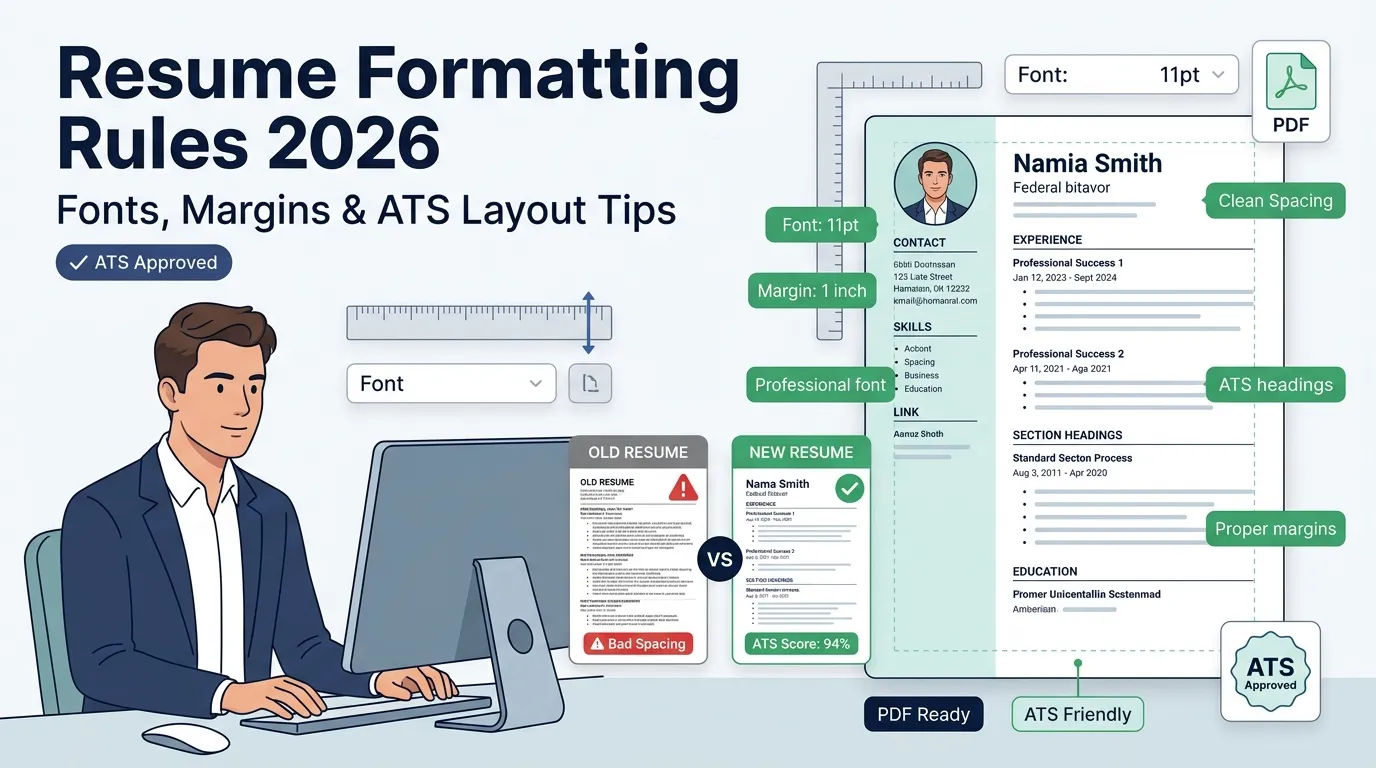
- Use 10–12pt fonts, 1-inch margins, and consistent spacing throughout.
- One page works for most people; two pages are fine for 10+ years of experience.
- PDF is the safest file format to send a resume.
- Tailor your resume to every job description.
Introduction
To format a resume means to organize your contact info, work history, skills, and education in a clean, readable layout that both hiring managers and hiring software can understand quickly. A well-formatted resume shows the right information in the right order and it does that job in about 7 seconds, which is how long most recruiters spend on a first look.
Asim Rahman
Executive Profile
Detail-oriented Resume Formatting Specialist dedicated to optimizing document structures to bypass Applicant Tracking Systems. Proven expertise in teaching job seekers exactly how to format a resume for maximum readability, balancing clean visual hierarchy with strict ATS compliance. Track record of increasing interview callback rates by transforming cluttered data into metric-driven career narratives.
AI & Tech Engine
Validated Credentials
Selected Achievements & Impact
Senior Resume Formatting Consultant
2022 – 2026- Structural Optimization: Developed comprehensive guidelines detailing exactly how to format a resume, standardizing templates that led to a 40% increase in successful ATS parsing for over 2,000 clients.
- Data Hierarchy: Redesigned visual flow and typographic hierarchies for executive profiles, reducing recruiter scan time by 15 seconds per document while retaining critical keywords.
- Template Engineering: Engineered 15+ proprietary, lightweight resume templates designed specifically to maintain high compatibility with modern screening algorithms, securing a 98% parser accuracy rate.
ATS Compliance Reviewer
2018 – 2022- Document Auditing: Conducted granular reviews of 5,000+ digital applications, advising candidates on essential adjustments regarding how to format a resume for automated systems.
- Process Improvement: Executed systemic formatting conversions from complex PDFs to standard Word/Text layouts, resolving critical data extraction errors and improving pipeline speed by 25%.
Academic Architecture
Bachelor of Arts in Digital Media
2014 – 2018Certificate in UX/UI Design Principles
2019Why Resume Formatting Matters
Good resume formatting helps your resume get read, understood, and remembered. Here are 5 reasons formatting directly affects your chances:
- Recruiters skim first. Most hiring managers spend 6–7 seconds on a first pass. Clean formatting makes your name, job title, and key skills easy to spot.
- ATS filters run before humans. Many companies use Applicant Tracking System software to scan resumes. Poor formatting can cause your resume to fail the scan before any person sees it.
- Formatting signals professionalism. A clean, consistent layout tells employers you pay attention to detail.
- Readable resumes get callbacks. According to the Yale University Office of Career Strategy, clear structure and white space make resumes significantly easier to read.
- Format affects length. Good formatting helps you fit more onto fewer pages without cramming text.
Choosing the Right Resume Format
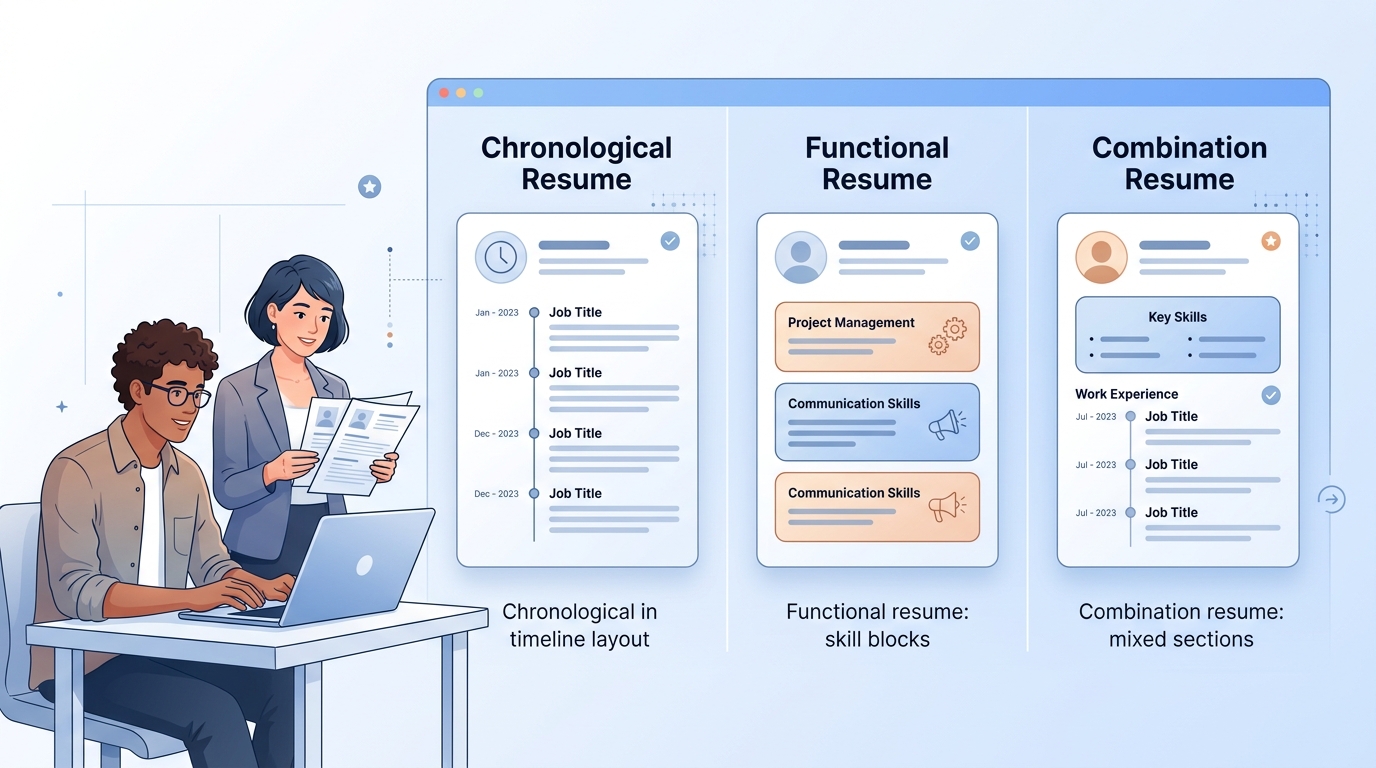
There are 3 main resume formats: chronological, functional, and combination. Each one works best for a different situation.
Chronological Resume Format
The chronological resume format lists your work history from most recent to oldest. It’s the most common format and the one most recruiters expect to see.
Best for: People with a steady work history in one or two fields.
Structure:
- Contact info at the top
- Summary or objective
- Work experience (most recent job first)
- Education
- Skills
Tips to Write Chronological Resumes
- List your most recent job at the top and work backward.
- Use reverse chronological storytelling — show growth from one role to the next.
- Include dates for every job (month and year).
- Focus each bullet point on achievements, not just duties.
- Keep job descriptions to 3–5 bullet points per role.
- Remove jobs older than 15–20 years unless they’re directly relevant.
Functional Resume Format
The functional resume format focuses on your skills rather than your timeline of jobs. It groups experience by skill category instead of by employer.
Best for: Career changers, people with employment gaps, or those entering a new field.
Structure:
- Contact info
- Summary
- Core skills (grouped by category)
- Brief work history (just titles, companies, dates)
- Education
Tips to Write Functional Resumes
- Group skills into 3–4 meaningful categories (e.g., “Project Management,” “Customer Service”).
- Under each category, use 2–4 bullet points with specific examples.
- Keep the work history section short — just names and dates.
- Craft a strong narrative for career pivots in your summary section.
- Be honest about gaps — a functional format doesn’t hide them, it just shifts focus.
- Note: some ATS systems struggle to parse functional resumes, so test yours carefully.
Combination Resume Format
The combination resume format blends both chronological and functional styles. It leads with a skills section and then includes a full work history.
Best for: People with strong skills and solid work history, or those with 10+ years of experience in multiple areas.
Structure:
- Contact info
- Summary
- Skills section
- Work experience (reverse chronological)
- Education
Tips to Write Combination Resumes
- Lead with your most valuable skills before diving into job history.
- Demonstrate cross-functional collaboration in your bullet points.
- Use the skills section to embed keyword density naturally for ATS.
- Don’t repeat the same information in both the skills and experience sections.
- Keep the whole document to 2 pages maximum.
Which Resume Format Should You Use?
Use a Chronological Resume if You Have a Steady Work History
Use the chronological resume format if you’ve worked consistently in the same field, have no major employment gaps, and are applying for a role similar to your past jobs. This is the default format and the safest choice for most job seekers.
Use a Functional Resume if You’re Changing Careers or Have Gaps
Use the functional resume format if you’re changing industries, re-entering the workforce after a gap, or have more skills than formal job titles. It lets you highlight transferable skills and craft a narrative for career pivots without leading with a spotty timeline.
Use a Combination Resume to Balance Skills and Experience
Use the combination resume format if you have strong, specific skills AND a solid work history. It works especially well for senior professionals, people applying for technical roles, or those who want to demonstrate both depth and breadth.
| Resume Format | Best For | Main Focus | ATS-Friendly | Recommended Length |
|---|---|---|---|---|
| Chronological | Stable work history | Work experience timeline | Yes | 1–2 pages |
| Functional | Career changers or gaps | Skills and abilities | Sometimes | 1 page |
| Combination | Senior professionals | Skills + experience | Yes (if simple layout) | 2 pages max |
Essential Resume Sections
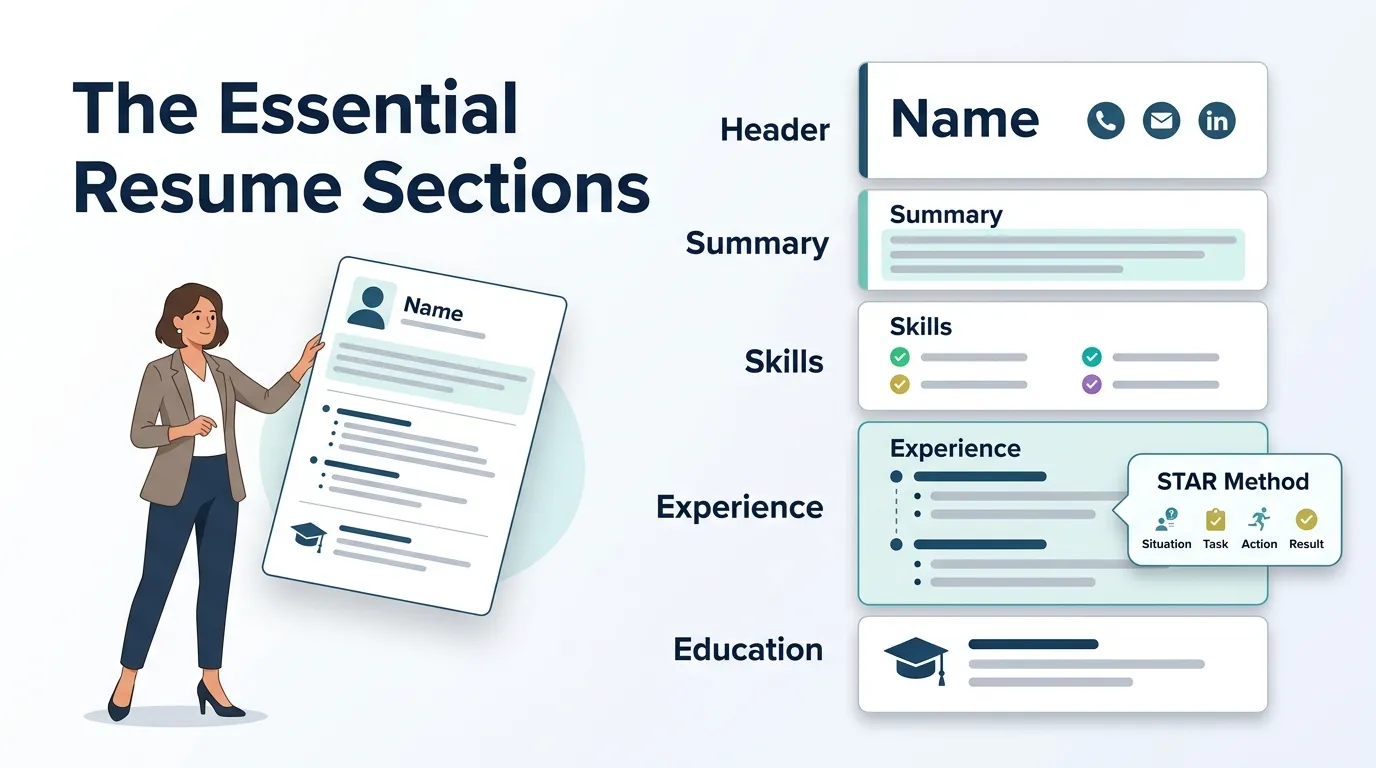
A well-formatted resume has 6 core sections and several optional ones. Here’s what to include in each.
Header: Name and Contact Details
Your header is the first thing a recruiter sees. It should include:
- Full name (larger font, bold)
- Phone number
- Professional email address
- City and state (not your full address)
- LinkedIn profile URL (optional but recommended)
- Portfolio or personal website (if relevant)
Keep your email professional — firstname.lastname@email.com is ideal. Avoid nicknames.
Personal Summary or Objective
The personal summary is a 2–4 sentence paragraph at the top of your resume that tells a recruiter who you are and what you bring to the table.
- A summary works best if you have experience: “Marketing manager with 7 years of experience in digital campaigns and a track record of increasing organic traffic by 40%.”
- An objective works best if you’re new to the workforce or changing careers: “Recent graphic design graduate seeking an entry-level position in UI/UX design.”
Keep it short, specific, and tailored to the role.
Key Skills
The key skills section is a short list of your top abilities — hard skills and soft skills. Format it as a 2-column list or single-line comma-separated list to save space.
Include skills that:
- Match the job description keywords
- You can demonstrate with real examples
- Are specific (e.g., “Python” not just “coding”)
Incorporating multilingual proficiency here adds significant value for international roles.
Education and Training
List your education in reverse chronological order. Include:
- School name
- Degree and major
- Graduation year (omit graduation year early in your career if you’re concerned about age bias)
- GPA (only if 3.5 or above)
- Honors or awards
For certifications and courses, list them here or in an “Additional Sections” area.
Professional Experience
The professional experience section is the most important part of your resume. List each job with:
- Job title
- Company name
- Location (city, state)
- Dates (month/year – month/year)
- 3–5 bullet points describing your accomplishments
Prioritize achievements over duties. Instead of “Managed a team,” write “Led a team of 8 developers to deliver a product 3 weeks ahead of schedule.”
Using the STAR Method
The STAR method helps you write stronger bullet points by following this structure:
- S — Situation: What was the context?
- T — Task: What was your responsibility?
- A — Action: What did you do?
- R — Result: What happened because of it?
Example: “Redesigned the onboarding process (S/T) by creating a 5-step digital workflow (A), reducing new employee ramp-up time by 30% (R).”
You don’t need to spell out S, T, A, R in your bullets — just make sure each one follows that logic.
Bullet Point Examples
Here are 5 strong resume bullet point examples:
- Increased quarterly sales revenue by 22% through a targeted email campaign reaching 15,000 subscribers.
- Reduced customer complaint rate by 35% by introducing a new ticketing and response system.
- Managed a $500,000 annual marketing budget across 4 channels with 110% ROI.
- Built and maintained 3 internal tools using Python that saved the operations team 6 hours per week.
- Trained and mentored 12 junior staff members, with 9 receiving promotions within 18 months.
Additional Sections
Include additional sections when they add real value to your application.
Leadership & Community Involvement
List leadership roles, volunteer work, or board positions. Quantify volunteer leadership roles where possible — “Led a 20-person volunteer team for annual food drive serving 500 families.”
Publications & Presentations
List any published articles, research papers, or conference presentations. Include the title, publication or event name, and year.
Licenses and Certifications
Include industry-specific certifications that are relevant to the job. Specify the certification name, issuing body, and expiry date if applicable.
Hobbies and Interests
Only include hobbies if they’re relevant to the role or show a meaningful skill. Mentioning “competitive chess” signals strategic thinking; “binge-watching TV” adds nothing.
References
Do not list references on your resume. Write “References available upon request” — or leave it off entirely. Bring a printed reference sheet to interviews instead. Learn how to format references on a resume separately when an employer asks for them.
Resume Length and Page Count
Ideal Length for Different Career Stages
The ideal resume length depends on your experience level:
| Career Stage | Recommended Length |
|---|---|
| Student / Entry-level | 1 page |
| 0–5 years experience | 1 page |
| 5–10 years experience | 1–2 pages |
| 10+ years experience | 2 pages |
| Executive / Academic | 2–3 pages |
Most resumes should be 1 page. Use 2 pages only when the extra content is genuinely relevant.
For federal job applications through the Government of Canada’s Job Bank or the U.S. federal system, longer resumes are acceptable and often expected.
The Importance of Page One
Everything that matters must appear on page one of your resume. Recruiters often read only the first page. Put your strongest achievements, most recent job, and key skills there. If something important is buried on page 2, consider moving it up or cutting less important content to make room.
Formatting and Design Tips
Margins and Spacing
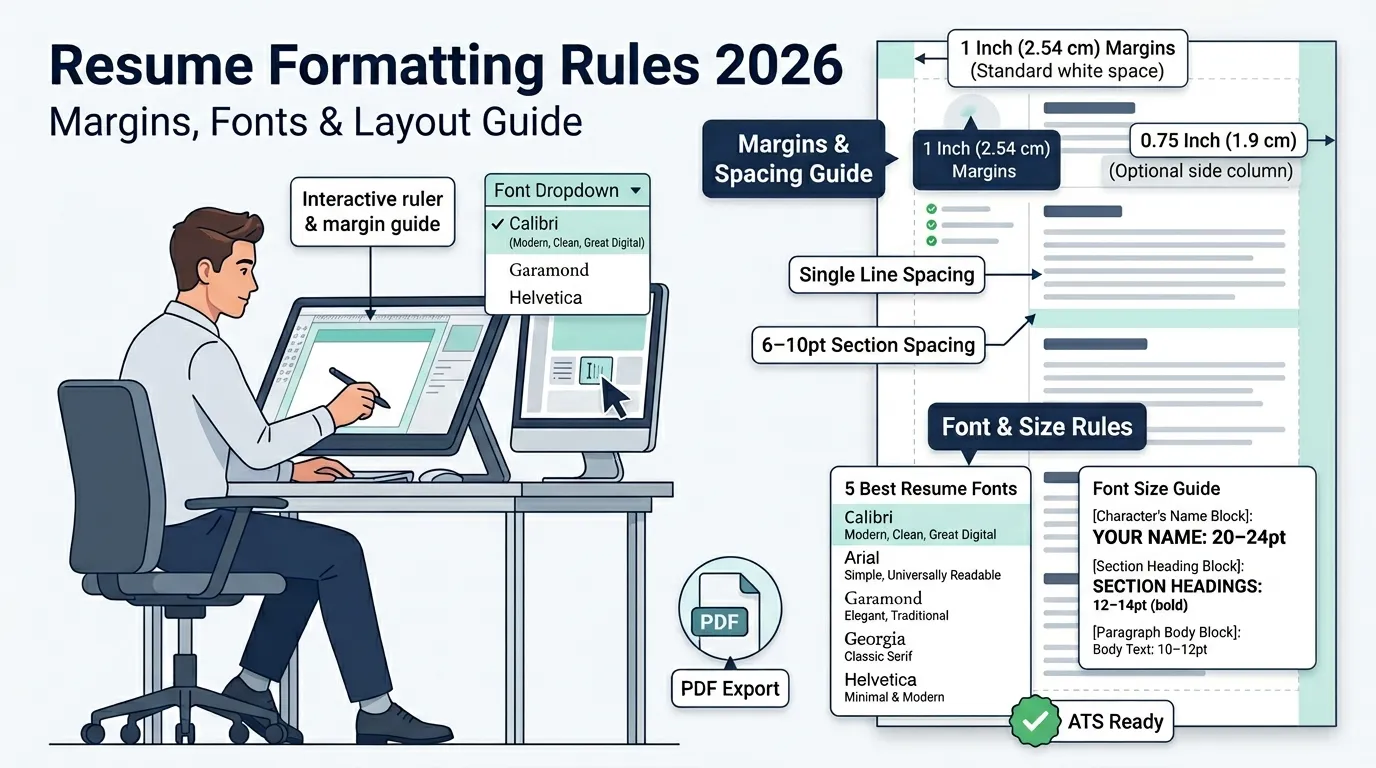
- Set margins to 1 inch (2.54 cm) on all sides.
- Reduce to 0.75 inches (1.9 cm) if you need slightly more room — never go below 0.5 inches (1.27 cm).
- Use single line spacing within sections and 6–10pt spacing between sections.
- Use white space strategically — breathing room makes your resume easier to skim.
Fonts and Font Sizes
Use clean, professional fonts only. Here are the 5 best resume fonts:
- Calibri — Modern, clean, great for digital resumes
- Arial — Simple and universally readable
- Garamond — Elegant, good for traditional industries
- Georgia — Classic serif, easy on the eyes
- Helvetica — Minimal and modern
Font size guide:
- Your name: 20–24pt
- Section headings: 12–14pt (bold)
- Body text: 10–12pt
Never go below 10pt. Never use decorative or script fonts.
| Element | Recommended Setting |
|---|---|
| Body Font Size | 10–12pt |
| Name Font Size | 20–24pt |
| Heading Font Size | 12–14pt |
| Margins | 1 inch (2.54 cm) |
| Minimum Margin | 0.5 inch (1.27 cm) |
| Line Spacing | Single |
| Section Spacing | 6–10pt |
| Best Fonts | Calibri, Arial, Helvetica, Georgia, Garamond |
Consistency in Formatting
Consistency in formatting is what makes a resume look polished. Check:
- All dates use the same format (e.g., Jan 2022 everywhere, not Jan 2022 in one place and 01/22 in another)
- All bullet points start with a verb
- All section headings are the same size and style
- Bold is used sparingly and consistently — only for job titles or key info
Using Microsoft Word’s Formatting Tools
Microsoft Word is the most widely used resume editor. Here’s how to format a resume in Word efficiently:
- Use Styles (Home > Styles) to apply consistent heading formats
- Use Tab stops for aligning dates to the right margin
- Use Line spacing (Paragraph > Spacing) to control gaps between sections
- Use the Ruler to set consistent indents
- Use Find & Replace to catch inconsistent formatting
- Use Microsoft Copilot (Word’s built-in AI) to check for grammar and suggest rewording
How to Format a Resume with AI
AI tools like Microsoft Copilot, ChatGPT, and Claude can help you format a resume and improve your content. Here’s how to format a resume for AI-assisted writing:
- Write your raw experience in plain text
- Paste it into an AI tool with the prompt: “Rewrite this as professional resume bullet points using action verbs and measurable results”
- Review the output and edit for accuracy
- Run it through an ATS checker to test keyword density
AI is a helpful starting point, but always review and personalize the output. Use AI for resume writing to speed up drafting, not to replace your own voice. To learn more about using AI for resume writing, see the additional resources section at the end of this guide.
ATS-Friendly Resume Formatting
ATS (Applicant Tracking System) software scans resumes before any human reads them. According to SEEK and other major job platforms, more than 75% of large companies use ATS to filter applicants.
How to Choose an ATS-Friendly Resume Format
The chronological resume format is the most ATS-friendly resume format because it follows a predictable structure that ATS systems know how to parse. Use a single-column layout for best results.
Avoid:
- Tables and text boxes (ATS often can’t read them)
- Headers and footers (ATS may skip them)
- Images and graphics
- Fancy columns or multi-column layouts
Tips for ATS Optimization
There are 8 tips to pass ATS filters and get your resume seen:
- Use standard section headings — “Work Experience,” “Education,” “Skills” — not creative alternatives
- Embed keyword density naturally from the job description
- Tailor for applicant tracking by matching the job title in your summary
- Spell out abbreviations on first use — write “Search Engine Optimization (SEO)” not just “SEO”
- Use a simple, clean font like Arial or Calibri
- Submit in .docx or PDF format — most ATS systems read both, but check the job posting for instructions
- Avoid images, icons, and graphics
- Use standard bullet points (•) not symbols or emojis
| ATS Requirement | Recommended | Avoid |
|---|---|---|
| Layout | Single-column | Multi-column |
| File Type | PDF or .docx | Image PDF |
| Fonts | Arial, Calibri | Script fonts |
| Section Titles | Work Experience, Skills | Creative titles |
| Graphics | None | Icons, charts, photos |
| Bullet Points | Standard bullets (•) | Emojis or symbols |
| Headers/Footers | Avoid | Contact info inside them |
| Keywords | Match job description | Generic wording |
Common Resume Formatting Mistakes to Avoid
What Not to Include
Photos
Do not include a photo on your resume for most job applications in the U.S., U.K., Canada, or Australia. Photos invite unconscious bias and are considered unprofessional in these markets. Some European countries and creative roles are exceptions.
Roles Undertaken More Than 20 Years Ago
Remove work experience older than 15–20 years unless it’s directly relevant. Older roles take up space, may signal age bias, and rarely add value to modern applications.
The Words ‘Curriculum Vitae’
Do not write “Curriculum Vitae (CV)” at the top of a standard resume. In North America, CVs are reserved for academic, research, or medical positions. Using the term for a regular job application signals unfamiliarity with local norms.
Top Five Resume Mistakes
These are the 5 most common resume formatting mistakes and how to fix each:
- Using one resume for every job. Fix: Tailor your resume for each job description.
- Generic bullet points with no numbers. Fix: Quantify every achievement you can.
- Inconsistent dates or formatting. Fix: Do a formatting check pass before submitting.
- Too much text, no white space. Fix: Cut weak bullet points and use consistent spacing.
- Wrong file format. Fix: Submit as PDF unless the employer asks for .docx.
Tailoring Your Resume to Job Descriptions
Tailoring your resume means editing it specifically to match the language and requirements of each job you apply for. Here’s a 5-step process:
- Read the job description carefully and highlight key requirements and skills.
- Copy exact keywords from the posting (job title, skills, tools, qualifications).
- Match your summary to the role — use the same words the employer used.
- Reorder or rewrite bullet points to lead with the most relevant experience.
- Include remote work proof if it’s relevant — show your ability to work independently.
This is not dishonest. It’s speaking the employer’s language. A tailored resume performs significantly better both with ATS and with human reviewers.
Proofreading and Final Review
Before sending your resume, run through this 8-point final checklist:
- Read the whole document out loud — you’ll catch errors your eyes skip.
- Check every date for accuracy and consistent formatting.
- Verify all URLs (LinkedIn, portfolio) still work.
- Confirm your email address and phone number are correct.
- Check for consistent verb tense — past tense for old jobs, present for current job.
- Review fonts and sizes — make sure nothing changed unexpectedly.
- Run a spell check in Microsoft Word or Google Docs.
- Ask one other person to read it — fresh eyes catch what yours miss.
Resume Templates and Examples
How to Choose a Resume Template
Consider Your Experience
Entry-level job seekers benefit from simple, clean templates with room for education and skills. Senior professionals need more space for work history and achievements.
Match Your Industry
Creative fields (design, marketing, media) can use modern or creative resume templates. Corporate fields (finance, law, healthcare) work better with traditional or minimalist resume templates.
Align Your Goals
If you’re seeking a promotion, choose a template that highlights leadership. If you’re changing careers, choose one that leads with a strong skills section.
Think About ATS
Any template you use must be ATS-friendly. Avoid templates with heavy graphics, columns, or text boxes. Stick to single-column, text-based layouts for applications at large companies.
How to Use a Resume Template
Step 1: Choose a Resume Template
Pick a template that matches your industry, career stage, and ATS needs. Sources include Microsoft Word, Google Docs, Canva, and resume-specific platforms.
Step 2: Add Your Content
Replace placeholder text with your actual information. Start with your name and contact details, then fill in each section in order.
Step 3: Customize the Layout
Adjust fonts, spacing, and section order to fit your experience. Remove sections you don’t need and add ones that are relevant.
Step 4: Optimize and Download
Run an ATS check, proofread your resume, then download it as a PDF or .docx depending on the employer’s preference.
Resume Templates by Format
These are the main template categories available:
ATS Resume Templates — plain, structured, single-column layouts designed to pass automated screening.
Modern Resume Templates — clean design with subtle colors and a contemporary feel.
Traditional Resume Templates — classic black-and-white layouts for conservative industries.
Simple Resume Templates — minimal design with standard formatting and no frills.
Creative Resume Templates — visually designed for portfolios, design roles, or creative agencies.
Minimalist Resume Templates — stripped-back design with strong typography and white space.
Infographic Resume Templates — visual layouts using charts or timelines; use only for non-ATS applications or creative portfolios.
Photo Resume Templates — include a headshot; appropriate mainly in European markets or for certain media/modeling roles.
One-Page Resume Template — ideal for students and early-career professionals.
Two-Page Resume Template — for 10+ years of experience or senior roles.
One-Column Resume Templates — best for ATS compatibility.
Two-Column Resume Templates — better for human readability; test for ATS first.
Timeline Resume Templates — visually show career progression; use for non-ATS applications only.
Resume Templates by Career Stage
Entry-Level Resume Templates — emphasize education, skills, and any internship or volunteer experience.
Intern Resume Templates — short, simple, and skills-focused.
Senior Resume Templates — highlight leadership, major accomplishments, and years of expertise.
Executive Resume Templates — detailed, achievement-heavy, often 2 pages, with a strong executive summary.
Resume Templates by Career Stage (Academic & Specialized)
Scholarship Resume Templates — focus on GPA, awards, leadership, and community involvement.
College Resume Templates — combine academic achievements with part-time jobs and extracurriculars.
MBA Resume Templates — highlight leadership, business impact, and pre-MBA career trajectory.
Tech Resume Templates — emphasize technical skills, programming languages, and project outcomes.
Finance Resume Templates — focus on quantified results, certifications (CFA, CPA), and analytical skills.
Sales Resume Templates — lead with revenue numbers, quotas met, and client acquisition metrics.
Healthcare Resume Templates — include licenses, certifications, clinical experience, and patient care metrics.
Education Resume Templates — highlight teaching philosophy, classroom experience, curriculum development, and certifications.
Art Resume Templates — minimal and visually clean; link to a portfolio.
Resume Templates by File Format
Free Word Resume Templates — editable in Microsoft Word; easy to customize.
Free Google Docs Resume Templates — collaborative and accessible from any device.
PDF Resume Templates — locked formatting; best for submitting final versions.
Sending and Saving Your Resume
File Types: PDF vs. DOC
PDF is the preferred file format for sending a resume in most situations. It preserves your formatting exactly as designed, regardless of the device or software the employer uses.
Use .docx when:
- The job posting specifically asks for a Word document
- You’re submitting to an older ATS system that can’t read PDFs
- A recruiter asks for an editable version
Use PDF when:
- Applying through an online portal
- Emailing directly to a hiring manager
- Posting to job boards like SEEK or LinkedIn
How to Save a Resume in PDF Format
In Microsoft Word:
- Go to File > Save As
- Choose PDF from the format dropdown
- Click Save
In Google Docs:
- Go to File > Download
- Select PDF Document (.pdf)
Always open the PDF after saving to confirm the formatting looks correct.
Frequently Asked Questions
How Many Pages Should a Resume Be?
A resume should be 1 page for most people with under 10 years of experience and up to 2 pages for those with 10 or more years. A 3-page resume is acceptable only for academic, executive, or government applications. The Ivy League career offices, including Yale University’s Office of Career Strategy, consistently recommend 1 page for most job seekers.
Which Resume Format Is Best for ATS Software?
The chronological resume format is best for ATS software because it uses a clear, predictable structure with standard section headings and no complex design elements. Pair it with a single-column layout for maximum compatibility.
Should I Include a Photo on My Resume?
No, you should not include a photo on your resume for most jobs in North America, the U.K., or Australia. Photos introduce potential bias and are generally considered unprofessional for standard job applications. The exception is roles in modeling, acting, or certain European markets where photos are expected.
Can ChatGPT Write My Resume?
Yes, ChatGPT can help write and format a resume, but it works best as a drafting assistant, not a replacement for your own input. Use it to generate bullet point options, rewrite weak sentences, or suggest keywords — then edit the output so it accurately represents your real experience. Always fact-check everything AI writes.
What Is the 7-Second Rule in Resume?
The 7-second rule in resume writing refers to the average time a recruiter spends scanning a resume on a first pass — approximately 6–7 seconds. This means your name, most recent job title, company name, and a key achievement must be immediately visible at the top of the page without scrolling or searching.
How to Format References on a Resume?
Do not include references directly on your resume. Create a separate reference sheet that includes each reference’s full name, job title, company, phone number, email, and your relationship to them. Bring it to interviews or submit it when specifically requested.
Summary
Formatting a resume correctly means choosing the right format (chronological, functional, or combination), organizing each section clearly, using clean fonts and proper margins, and passing both ATS software and human review.
Quick recap of the most important points:
- Choose your format based on your career stage and goals — chronological for steady history, functional for pivots or gaps, combination for senior roles.
- Fill all 6 core sections — header, summary, skills, education, experience, and additional info where relevant.
- Use 10–12pt fonts, 1-inch margins, and consistent formatting throughout.
- Keep it 1 page for most roles; 2 pages are fine for 10+ years of experience.
- Optimize for ATS by using standard headings, simple layouts, and relevant keywords from the job description.
