

Key Takeaways
- An ATS automates the full hiring pipeline | posting jobs, parsing resumes, scheduling interviews, and tracking offers all in one place.
- AI-powered screening ranks candidates faster, but needs human review to avoid filtering out qualified applicants.
- There is an ATS for every budget: free tools for small teams, mid-market platforms for growing companies, and enterprise systems for large organizations.
- Compliance tracking, audit trails, and bias mitigation are now standard ATS features not extras.
- Job seekers pass ATS filters by mirroring job description keywords, using simple formatting, and getting an employee referral.
Short Summary
An Applicant Tracking System (ATS) is recruitment software that automates how organizations collect, screen, and manage job applications. ATS software features include resume parsing, candidate screening, interview scheduling, and hiring pipeline management from job posting to offer acceptance.
The 3 main benefits of applicant tracking system software are reduced time-to-fill, lower cost-per-hire through recruitment process automation, and improved hiring quality via AI-powered candidate matching.
An ATS consists of 6 core components: a job posting module, a resume parser, a candidate database, an interview scheduler, an offer management system, and a reporting dashboard. Cloud-based ATS platforms from vendors like Greenhouse, Lever, BambooHR, and JazzHR serve organizations of every size.
Definition and Overview
What is an ATS?
An Applicant Tracking System (ATS) is a software application that manages the entire recruitment process electronically. An ATS stores candidate data in a centralized recruitment database, automates job posting across multiple channels, parses resumes to extract qualifications, and tracks each applicant through every stage of the hiring pipeline.
ATS software replaces manual spreadsheets and email chains with a structured digital workflow. The system creates a single source of truth for all candidate information, job requisitions, interview notes, and hiring decisions. Modern applicant tracking system software operates as a cloud-based ATS, accessible from any browser or mobile device, with integration capabilities for HRIS platforms, background check providers, and job board networks.
How does an ATS work?
An ATS works through a 5-step automated workflow that moves candidates from application to hire:
- Job Requisition Creation | A hiring manager creates a requisition capturing the role title, qualifications, salary range, and approval chain.
- Multi-Channel Job Distribution | The ATS publishes the posting to job boards (Indeed, LinkedIn, Glassdoor), the company career site, and social media platforms through job posting automation.
- Application Collection and Resume Parsing | Resume parsing software extracts structured data (name, work history, education, skills) from each resume regardless of file format.
- Screening and Ranking | The candidate screening system compares qualifications against job requirements. AI-powered screening and matching algorithms assign scores based on keyword matching, skill alignment, and experience.
- Interview, Evaluation, and Hire | Qualified candidates enter the interview scheduling tool. Interviewers submit structured feedback, the team reviews scorecards, and the ATS triggers the offer management workflow.
Throughout this process, the ATS maintains an audit trail for compliance tracking and generates real-time reports and insights on metrics like time-to-fill, source effectiveness, and pipeline velocity.
Who uses an ATS?
There are 5 primary user groups for applicant tracking system software: corporate HR departments in industries including healthcare, manufacturing, banking and capital markets, hospitality, higher education, nonprofit, and public sector; talent acquisition teams tracking recruitment analytics; staffing and recruitment agencies managing multiple client accounts; hiring managers reviewing candidates and providing interview feedback; and small business owners running structured hiring without dedicated HR staff.
State and local government agencies, special districts, and public sector organizations use ATS platforms to meet specific compliance requirements including equal opportunity employment reporting.
ATS vs CRM
An ATS tracks candidates who have applied for a specific job. A Candidate Relationship Management (CRM) system engages talent who may not be actively looking | building passive candidate pools for internal mobility and future openings.
| Feature | ATS | CRM |
|---|---|---|
| Primary function | Manages active job applications | Builds relationships with passive candidates |
| Workflow trigger | Job requisition is opened | Ongoing talent pipeline nurturing |
| Best for | Processing and tracking applicants | Sourcing and engaging future candidates |
Many modern platforms, including Greenhouse, Lever, and Gem, combine ATS and CRM capabilities into a single talent acquisition software suite. The distinction matters for workforce planning: an ATS answers “who applied for this role?”, and a CRM answers “who should we reach out to before we post this role?”
Key Features of Applicant Tracking Systems
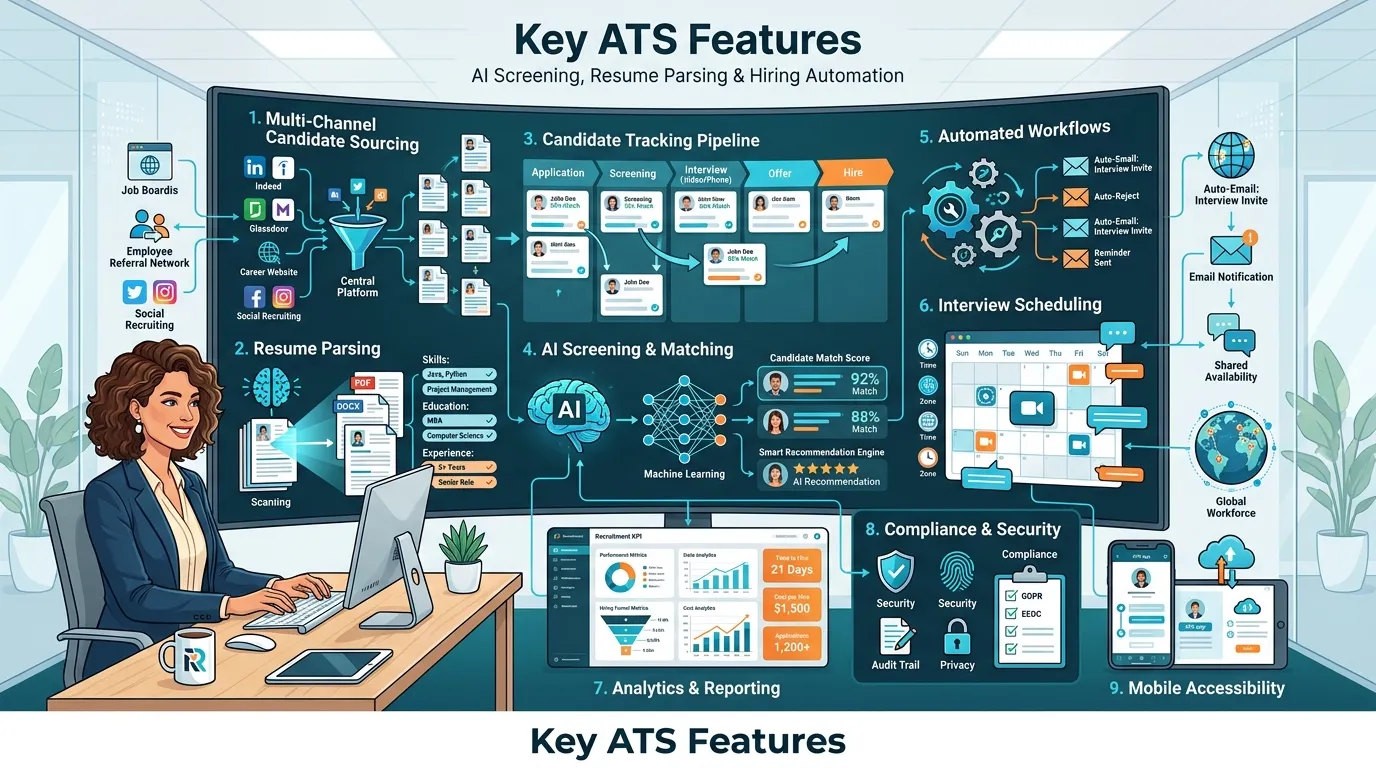
Multi-channel candidate sourcing
Multi-channel candidate sourcing allows recruiters to post jobs and collect applications from 10+ sources through a single interface. Job posting automation saves 3–5 hours per requisition. Employee referral tracking captures internal recommendations. For gig economy roles and contingent workforce tracking, some ATS platforms connect with vendor management systems to source temporary workers alongside permanent hires.
Resume parsing and storage
Resume parsing software extracts structured data from resumes in under 5 seconds per document. The parser categorizes contact details, employment history, education, skills, and certifications from PDF, DOCX, and plain text formats. The candidate database stores all parsed resumes, creating a searchable talent pool for current and future openings. This database supports multilingual workflows by parsing resumes in multiple languages. Modern AI-powered parsers achieve 85–95% accuracy on standard formats.
Candidate management and tracking
Candidate management gives recruiters a visual hiring pipeline showing every candidate’s status in real time. Hiring pipeline management includes Kanban-style boards for drag-and-drop movement, consolidated candidate profiles with interview notes and scorecards, duplicate detection, and talent pool segmentation for future outreach during skill gap analysis.
AI-powered screening and matching
AI-powered screening uses machine learning algorithms to rank candidates based on qualification match scores. There are 4 main screening methods: keyword matching, semantic matching (using NLP to understand context), predictive scoring based on historical hiring data, and skill assessment integration with third-party platforms.
Platforms like Eightfold AI and tools like Sana from Workday use artificial intelligence to surface candidates from the existing database who match new openings. Setting guardrails for automated screening prevents the system from filtering out qualified candidates based on rigid keyword matching alone.
Automated workflows and communication
Automated workflows eliminate 60–70% of repetitive administrative tasks. The 5 most common workflows are application acknowledgment emails, screening stage advancement, interview request triggers, rejection notifications, and offer letter routing after offer acceptance. For asynchronous hiring across time zones, automated workflows handle scheduling and follow-ups without recruiter intervention outside business hours.
Interview scheduling and collaboration tools
Interview scheduling tools reduce coordination time by 80%. The ATS integrates with Google Calendar and Microsoft Outlook to display real-time availability. Features include self-scheduling links, panel interview coordination, automated reminders before interview no-shows, video interview integration, and time zone detection. Collaboration tools let interview panels submit structured scorecards and share evaluations.
Analytics and reporting
A recruitment analytics dashboard provides real-time data on 15+ metrics including time-to-fill, cost-per-hire, source effectiveness, pipeline velocity, offer acceptance rate, and diversity metrics during diversity slate creation. Advanced ATS platforms generate predictive analytics that support workforce planning by connecting recruitment data with broader human capital management and talent management goals. During pay equity reviews and before performance reviews, ATS data provides baseline hiring information.
Compliance and bias mitigation
Compliance tracking features automate EEO reporting, OFCCP audit preparation, and data privacy management. Built-in functions include EEO-1 report generation, GDPR controls, audit trail documentation, and dispositioning requirements before compliance audits. Bias mitigation features include blind resume review, structured scorecards, and AI screening audits that flag adverse impact. For organizations in healthcare, higher education, public sector, and state and local government, compliance tools address industry-specific hiring regulations.
Mobile accessibility
A mobile-friendly ATS allows recruiters and candidates to complete hiring tasks from any device. Recruiters managing frontline workforce solutions in hospitality and manufacturing use mobile access to keep hiring moving. Over 60% of job seekers begin searching on mobile devices, so a mobile-first ATS with one-click apply directly affects application completion rates.
Benefits of Using an ATS
For recruiters and employers
Reduced time-to-fill and cost-per-hire
An ATS reduces time-to-fill by 25–40% and cost-per-hire by 20–30% within the first year through automation of posting, screening, scheduling, and communication.
Improved hiring quality and efficiency
Structured scorecards, AI-powered matching, and standardized interview processes surface the most qualified candidates through data-driven screening while freeing recruiters to focus on high-value activities.
Enhanced candidate experience
Timely automated communication, branded career pages, and personalized candidate experiences including pre-filled forms and tailored job recommendations increase application completion rates and strengthen employer branding.
Better collaboration and visibility
Pipeline dashboards, role-based permissions, shared notes, and in-app messaging keep everyone in the loop and replace scattered email threads with centralized communication.
Compliance and risk management
Automated documentation, consistent dispositioning, and demographic data separation protect organizations from discrimination claims and ensure alignment with federal, state, and local employment regulations.
For candidates
Streamlined application process
Resume parsing pre-fills fields, one-click apply reduces friction, and mobile-friendly forms let candidates complete applications in under 10 minutes from any device.
Faster communication and feedback
Automated workflows deliver status updates within hours instead of days. Self-service candidate portals show real-time application status, upcoming interviews, and submitted documents.
Types of ATS
Lightweight ATS for basic hiring
Designed for small businesses hiring fewer than 20 people per year. Platforms like Homebase, Recooty, and Boon cost $0–$100/month and provide core features: job posting, resume collection, basic tracking, and email communication.
Scalable ATS for growing teams
Built for mid-size companies hiring 20–500 per year. Platforms like Workable, Pinpoint, JazzHR, Ashby, and Manatal cost $200–$1,000+/month and include multi-channel sourcing, AI screening, custom workflows, and HRIS integration.
Enterprise ATS for large organizations
Built for organizations hiring 500+ per year across multiple locations. Platforms like Greenhouse, Lever, and Eightfold AI cost $5,000–$100,000+/year. Enterprise systems within Workday’s human capital management suite including Workday Paradox and Sana from Workday integrate with workforce management, payroll planning, financial management, and employee experience platforms. During merger integrations, these platforms consolidate recruiting operations.
ATS modules within HR platforms
Recruitment features embedded in broader human resource management suites. BambooHR combines ATS with onboarding and employee management. Deel HR adds hiring to global payroll. Folks HR integrates recruitment with performance management during probation periods. The advantage is unified data candidate records transition directly to employee records after onboarding feedback.
How to Choose the Right ATS
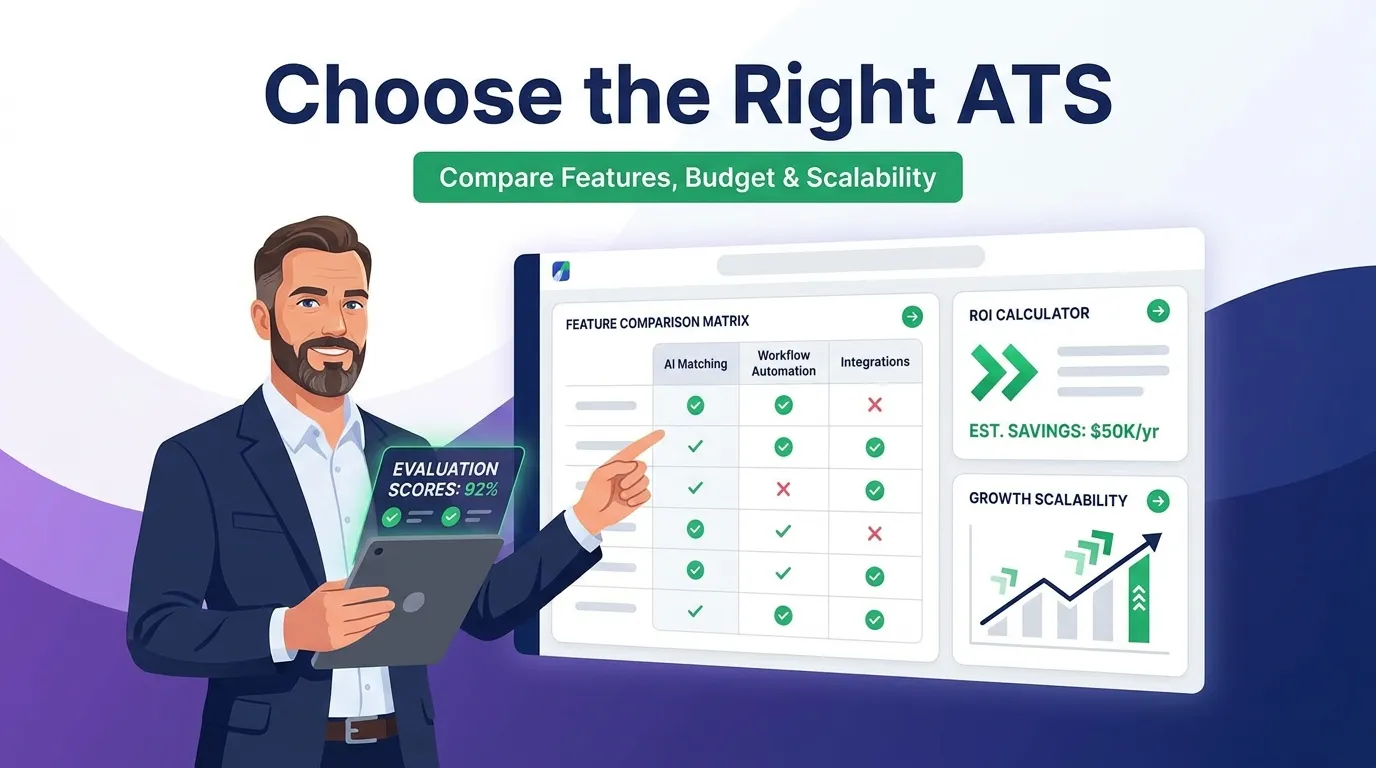
Assess your needs and budget
Document 3 baseline requirements: annual hiring volume, number of users, and budget range. Calculate current recruitment costs to determine how much an ATS should cost relative to expected efficiency gains.
Identify must-have vs. nice-to-have features
Create 2 lists: features required on day one and features needed within 12–18 months. Rank by impact on current pain points.
Evaluate scalability and integration capabilities
Confirm the ATS integrates with your HR tech stack and scales to 2–3x current hiring volume. Open APIs allow connections with proprietary systems, data cloud services, and platforms like Workday Extend.
Consider user experience and support
Test from 3 perspectives: recruiter, hiring manager, and candidate. Review user satisfaction on G2, Capterra, and TrustRadius.
Review vendor demos and trials
Request live demos with your actual hiring scenarios. Use free trial periods (14–30 days) to test with real postings and real candidates. Compare 3–4 vendors using a standardized scorecard.
Implementation Best Practices
Map your hiring process
Document every step from requisition approval through onboarding. This map becomes the blueprint for ATS pipeline configuration. Organizations that skip process mapping spend 2–3x more time on reconfiguration after launch.
Set guardrails for automated screening
Configure 3 categories: hard requirements (must-have qualifications), weighted preferences (bonus criteria), and override rules for referrals and internal transfers for internal mobility. Review screening results weekly during the first 30 days.
Train teams with real-world scenarios
Train using actual job requisitions and real candidate profiles. Allocate 4–8 hours for recruiters, 2–3 hours for hiring managers, 1 hour for interviewers, and 8–16 hours for administrators. Schedule follow-up sessions at 30 and 90 days.
Measure business impact
Track 5 baseline metrics before and after implementation: time-to-fill, cost-per-hire, application completion rate, candidate satisfaction, and hiring manager satisfaction. Most organizations achieve full ROI within 6–12 months.
Cost and Pricing
Pricing models and ranges
ATS software uses 4 pricing models: per employee/month ($5–$25), per recruiter/month ($50–$500), per job posting ($10–$100/month), and annual license ($3,000–$100,000+/year). Factor in implementation fees, data migration, training, and premium support.
Free vs. paid options
Free and open source applicant tracking system software options exist for limited budgets. Free tiers from Zoho Recruit, MightyRecruiter, and Homebase handle 1–5 hires per year. Paid platforms add automation, AI screening, compliance tools, and integrations. Organizations exceeding 10–15 hires per year typically find manual workarounds cost more than paid software.
ROI considerations
The 4 primary ROI drivers are recruiter time savings (10–20 hours/week recovered), reduced agency spend, faster time-to-fill (each day saved prevents $270–$410 in lost output on a $100K role), and quality of hire improvement (bad hires cost 30–200% of annual salary).
Future Trends in ATS
AI and machine learning advancements
Next-generation AI assistants analyze career trajectories, skill adjacencies, and growth potential beyond keyword matching. Workday’s artificial intelligence investments, including Sana from Workday, handle candidate communication through conversational interfaces.
Predictive analytics and enhanced matching
ATS platforms are building models that predict time-to-fill, offer acceptance likelihood, and post-hire performance. Enhanced matching algorithms identify high-potential candidates before workforce planning cycles.
Personalized candidate experiences
Dynamic career pages, adaptive application processes, and AI chatbots provide individualized interactions 24/7 across time zones. These tools support remote onboarding sequences by guiding new hires through pre-boarding tasks.
Integration with emerging technologies
Expanding connections with skills-based marketplaces, blockchain credentials, contract intelligence, contract lifecycle management, and supply chain management for healthcare. Student management platform integrations create campus recruiting pipelines. Workday ERP and Workday Build enable custom recruitment workflows connected to financial planning and spend management.
Focus on diversity and inclusion
Measurement and intervention tools address bias at every funnel stage. Language analysis scans job descriptions for biased wording. Blind review removes identifying information. These tools support pay equity reviews and connect with employee voice initiatives.
Tips for Job Seekers: How to Pass ATS Filters
Tailor your resume to the job description
Match your resume language to the exact terms in the job posting. A resume using “project coordination” when the posting says “project management” may score lower even when the experience is equivalent.
Use simple formatting and fonts
Use a single-column layout, standard headings (Experience, Education, Skills), and a common font (Arial, Calibri). Avoid headers, footers, text boxes, and tables.
Avoid images and graphics
Do not include photos, logos, icons, or charts. ATS parsers cannot read image-based content. Replace skill bars with text descriptions.
Include relevant keywords
Place keywords from the job description in context within experience descriptions. Include hard skills, job titles, and industry terms. Use the full term and abbreviation on first mention (e.g., “Search Engine Optimization (SEO)”).
Network and seek referrals
Employee referrals bypass initial ATS screening filters in many organizations. Referred candidates are flagged in the ATS and routed directly to a recruiter for review through employee referral tracking.
Here is Example
Sarah Mitchell
Executive Profile
Data-driven People Operations professional specialized in optimizing digital hiring funnels, database architecture, and compliance. Proven record managing high-volume data streams, minimizing operational friction, and deploying automated internal workflows.
AI & Tech Engine
Validated Credentials
Selected Achievements & Impact
Applicant Tracking System Software Administrator
2020 – 2024- System Optimization: Engineered advanced parsing filters and data mapping configurations, reducing administrative review loops.
- Process Innovation: Reconstructed legacy hard-copy records pipelines into fully secure cloud infrastructure, increasing **document retrieval speed by 30%**.
- Resource Coordination: Supervised automated cross-calendar mapping matrixes to align interviews for an executive roster of 12 operators.
Office Operations Coordinator
2017 – 2020- Data Integrity: Executed systemic database management parameters, securing a verified **98% data accuracy score** across high-volume digital records logs.
- Workflow Syncing: Managed multi-department client milestones, ensuring immediate reporting synthesis for business consultants.
Academic Architecture
Associate Degree in Business Administration
2015 – 2017High School Diploma
2011 – 2015Top ATS Vendors and Comparisons
Here is a comparison of 25 leading applicant tracking system platforms:
| Vendor | Best For | Starting Price |
|---|---|---|
| Greenhouse | Mid-market/enterprise structured hiring | Custom pricing |
| Workable | Scalable ATS with built-in sourcing | ~$189/month |
| Zoho Recruit | Corporate HR and staffing agencies | Free tier available |
| Lever | Combined ATS + CRM functionality | Custom pricing |
| Teamtailor | Employer branding-focused recruitment | Custom pricing |
| Pinpoint | In-house talent acquisition teams | Custom pricing |
| JazzHR | Small business hiring | ~$75/month |
| Eightfold AI | AI-powered talent intelligence | Custom pricing |
| Ashby | All-in-one ATS with deep analytics | Custom pricing |
| Gem | Pipeline analytics and sourcing | Custom pricing |
| Manatal | AI recommendations + social enrichment | $15/user/month |
| Recruit CRM | Staffing and recruitment agencies | Custom pricing |
| Dover | Automated sourcing and screening | Custom pricing |
| BambooHR | SMB HR platform with built-in ATS | Custom pricing |
| Deel HR | Global hiring with international payroll | Custom pricing |
| Homebase | Hourly/shift-based businesses | Free tier available |
| Folks HR | Canadian SMBs with bilingual support | Custom pricing |
| Boon | Employee referral-based hiring | Custom pricing |
| Tellent Recruitee | Collaborative team-based hiring | Custom pricing |
| Monday.com | ATS within work management platform | Custom pricing |
| Loxo | AI candidate discovery (1.2B+ profiles) | Custom pricing |
| Wellfound | Startup-focused hiring | Free job postings |
| Recooty | Simple ATS for small businesses | $29/month |
| VanHack | Cross-border tech talent hiring | Custom pricing |
| MightyRecruiter | Free ATS with resume database | Free |
Summary
An Applicant Tracking System (ATS) is software that automates hiring from job posting to offer in one platform. It handles resume parsing, candidate screening, interview scheduling, and compliance tracking. Companies of all sizes use ATS tools to cut time-to-fill, reduce hiring costs, and make better decisions faster. Pricing runs from free to enterprise-level, with most teams seeing ROI within 6–12 months.
