

Key Takeaways
-
Skills to list on a resume should always match the job description. Relevance matters more than quantity.
-
Employers and ATS systems look for skills in three places: the summary, the skills section, and work experience bullets.
-
Hard skills and tools (computer skills, data analysis, project management) carry the most weight in ATS scans.
-
Soft skills work only when proven with examples and results inside bullet points.
-
Listing 12–18 targeted skills is more effective than a long, generic skills list.
-
Use the same wording as the job posting to improve ATS resume scoring.
-
Resume skills should be supported by numbers, tools, or outcomes, not vague claims.
-
A clean format and clear language help recruiters quickly see job fit.
Introduction
If you searched skills to list on resume, you want a skills list that matches real USA job posts, reads clean in an Applicant Tracking System (ATS), and makes a hiring manager say “this person fits.”
In this guide, i walk through getting started, why the skills section matters, the main types of skills for your resume, and the essential skills employers actually scan for.
Then i show how to place skills in the right spots, how to prove skills inside bullet points, how to use ATS keywords, and how to avoid common mistakes.
You will get a correct USA resume example, two resume templates, and practical steps for matching skills to a job description.
Getting Started with Your Resume
A strong resume starts with two decisions:
-
The target job title
-
The skills you will prove for that job title
People ask me: what do jobs look for in a resume? USA recruiters look for clear fit. Fit means the same skills and tools from the job post show up in your resume summary, your skills section, and your work bullets.
Before writing your skills list, do this quick setup:
-
Copy the job post into a document
-
Highlight the repeated skill words (tools, tasks, soft skills, certifications)
-
Pick 12–18 skill keywords to place in the resume
-
Pick 6–10 skill keywords to place in your summary for resume
That is the base for skills for resume, skills to put on resume, and best skills to put on a resume.
Why a Skills Section Matters
The skills section helps 3 audiences:
-
The ATS scan
-
The recruiter scanning fast
-
The hiring manager comparing candidates
A good skills section answers: what goes into the skills section of a resume? The answer is job-relevant hard skills, job-relevant soft skills, and tool keywords written in the same language as the job post.
Relevancy is Critical
Relevancy decides interview rate. A resume with 30 random skills reads as unfocused. A resume with 14 skills that match the job post reads as ready.
If you are asking what are some skills to put on a resume, start with the role type:
-
Customer service role: customer service skills, conflict resolution, CRM tools
-
Data role: data analysis, SQL, Excel, dashboards
-
Admin role: scheduling, calendar management, document control
-
Sales role: sales, upselling, pipeline management
These choices create good skills to put on a resume and job skills for resume.
Interpret the Job Description
To interpret a job description, sort words into 4 buckets:
-
Tools (Excel, Google Workspace, CRMs, ticketing systems)
-
Tasks (data entry, reporting, scheduling, training)
-
Soft skills (communication, teamwork, time management)
-
Outcomes (quality assurance, accuracy, speed, satisfaction scores)
This makes it easier to match skills to have on resume to the job.
Types of Skills for Your Resume
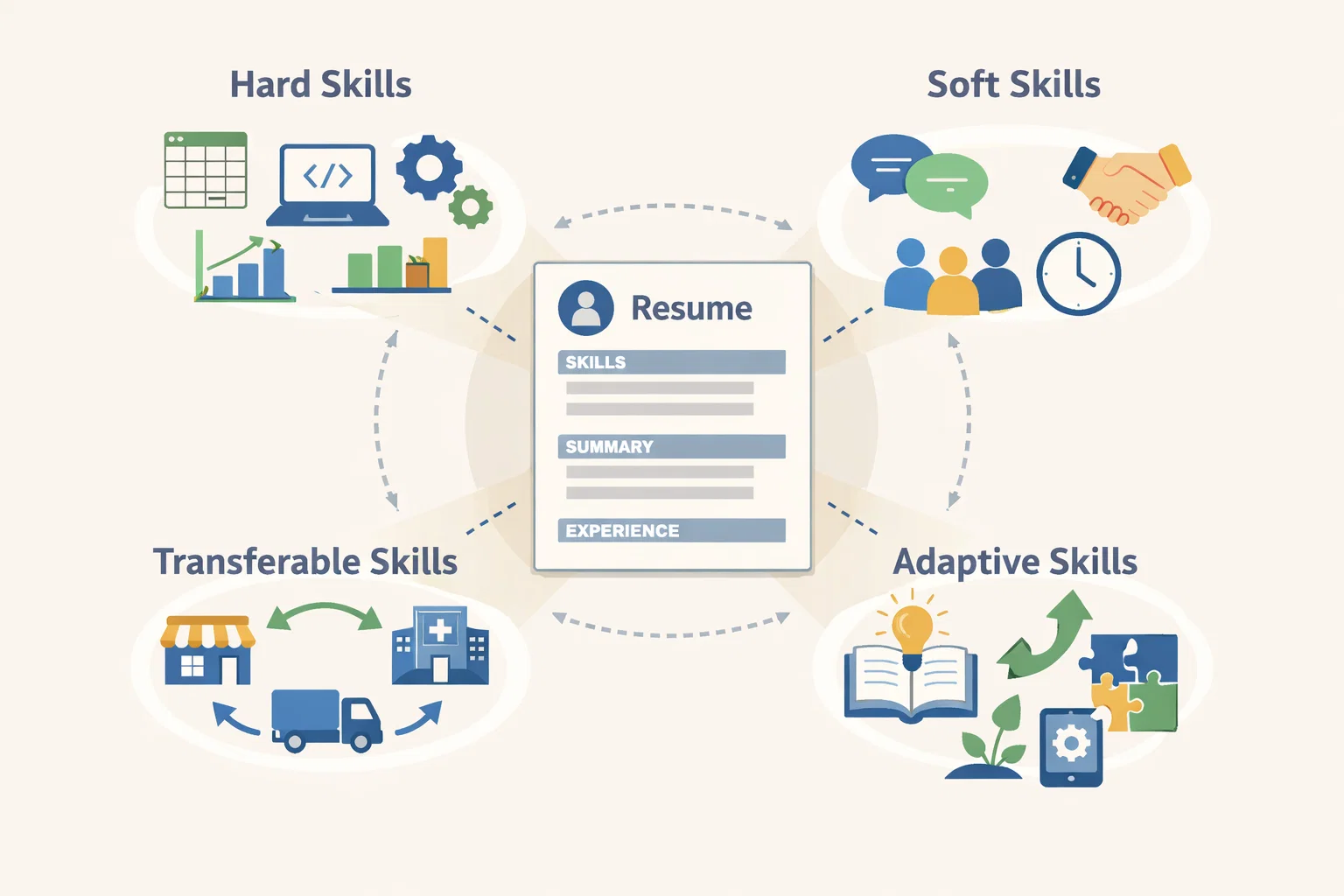
Hiring teams look for a mix. Your job is to pick the mix that fits the role.
Hard Skills
Hard skills are teachable and specific. Examples:
-
Data entry
-
Excel formulas
-
Google Workspace
-
Project management tools
-
Programming languages
-
Accounting software
-
Quality assurance testing
Hard skills are the backbone of resume skills and abilities examples.
Soft Skills
Soft skills describe how you work. Examples:
-
Communication
-
Teamwork
-
Time management
-
Critical thinking
-
Cultural competence
Soft skills must be backed by evidence. If you want how to add soft skills to resume, the right method is to show the soft skill inside a work bullet with a result.
Transferable Skills
Transferable skills carry across jobs. Examples:
-
Customer service skills used in retail and in healthcare
-
Project management used in marketing and in supply chain management
-
Data analysis used in finance and in operations
Transferable skills help when you change industries.
Adaptive Skills
Adaptive skills help in fast-changing work. Examples:
-
Tech-savviness
-
Continuous learning
-
Problem-solving under pressure
-
Cross-functional team alignment
People often search tech savvy on resume. In a resume, “tech-savvy” is stronger when you name tools and results.
How to Effectively List Skills on Your Resume
People ask where to put skills on resume because placement changes ATS scoring. Here is the practical approach.
Keep Your Skills Specific and Clear
Write skills as concrete phrases, not vague traits.
Weak:
-
Hardworking
-
People person
-
Fast learner
Strong:
-
Customer complaint resolution
-
Excel pivot tables
-
Quality assurance checks
-
Calendar management
This makes your skills for resume examples stronger.
Organize Your Skills List
Use categories when it helps:
-
Tools
-
Hard skills
-
Soft skills (limited)
-
Domain skills
This answers what kind of skills to put on resume and what to put in skills section of resume.
Where to Include Skills
You can place skills in 3 areas. Each area has a different job.
At the Top of Your Resume
Use a skills line under your summary for resume if the role is skill-heavy. Examples: IT, data, accounting, developer roles.
This helps the ATS scan because it sees keywords early.
At the Bottom of the Resume
Place a small skills section at the bottom when your work history already shows skills clearly and the job is less tool-heavy.
Throughout Your Resume
This is the best method for most roles.
Headline
Use a headline that includes your role and 1–2 core skills.
Example:
Administrative Assistant | Scheduling, Customer Support, Data Entry
Summary Paragraph
Use 6–10 skills in a clean sentence. This supports resume summary examples and how to write summary in cv.
Work Experience
Repeat the same skill keywords inside bullets with proof. This improves ATS scoring and answers what to say for skills on a resume.
Show How You’ve Used Your Skills in Your Bullet Points
A resume bullet should show:
Action + Skill + Tool + Outcome
Examples:
-
Resolved 30+ customer tickets per day in Zendesk, meeting a 95% satisfaction score
-
Built weekly sales reports in Excel using pivot tables, reducing manual work by 2 hours per week
-
Coordinated calendars for 4 leaders in Outlook, reducing scheduling conflicts by 40%
These are resume skills and abilities examples that hiring managers trust.
Include Your Skills in Other Resume Sections
Good places to add skills:
-
Certifications
-
Projects
-
Volunteer work
-
Awards
This supports best things to say on a resume because it gives proof in multiple sections.
Add Certificates, Classes, and Certifications
In the USA, certifications strengthen your skill claims. Examples:
-
Google Data Analytics Certificate
-
CompTIA A+
-
CPR/First Aid (for child care and healthcare roles)
-
Project Management Professional (PMP) or CAPM
This also supports searches about what are some good qualifications to put on a resume.
Use the Same Language as the Job Description
If the job post says “calendar management,” use “calendar management,” not “schedule handling.” If the job post says “Google Workspace,” use “Google Workspace.” This is a simple ATS rule that works.
Resume Tips
Resume Language Should Be:
-
Clear
-
Specific
-
Consistent
-
Measurable
-
Role-focused
Top Five Resume Mistakes:
-
Listing skills with no proof
-
Using generic skills that do not match the job post
-
Adding too many soft skills without examples
-
Writing a summary that does not match the target job
-
Using tool names wrong (example: writing “Google Suite” only)
Note: many people type google suite on resume. The more common product name is Google Workspace. You can write:
Google Workspace (Docs, Sheets, Drive)
That captures both searches and ATS keywords.
Don’t:
-
Don’t list 40 skills
-
Don’t use buzzwords with no proof
-
Don’t hide your tools and platforms
-
Don’t write a skills section that conflicts with your work history
Do:
-
Do list 12–18 skills that match the job post
-
Do use the same wording as the job post
-
Do show skills in your bullets with numbers
-
Do tailor skills for each job application
Action Verbs for Your Resume
Use verbs that show responsibility:
Managed, Led, Coordinated, Built, Analyzed, Delivered, Supported, Trained, Improved, Resolved, Documented, Audited, Monitored, Implemented, Streamlined
Pair action verbs with skills and tools:
-
Built dashboards in Excel
-
Resolved customer issues using a ticketing system
-
Audited records for quality assurance
Matching Skills to the Job Description
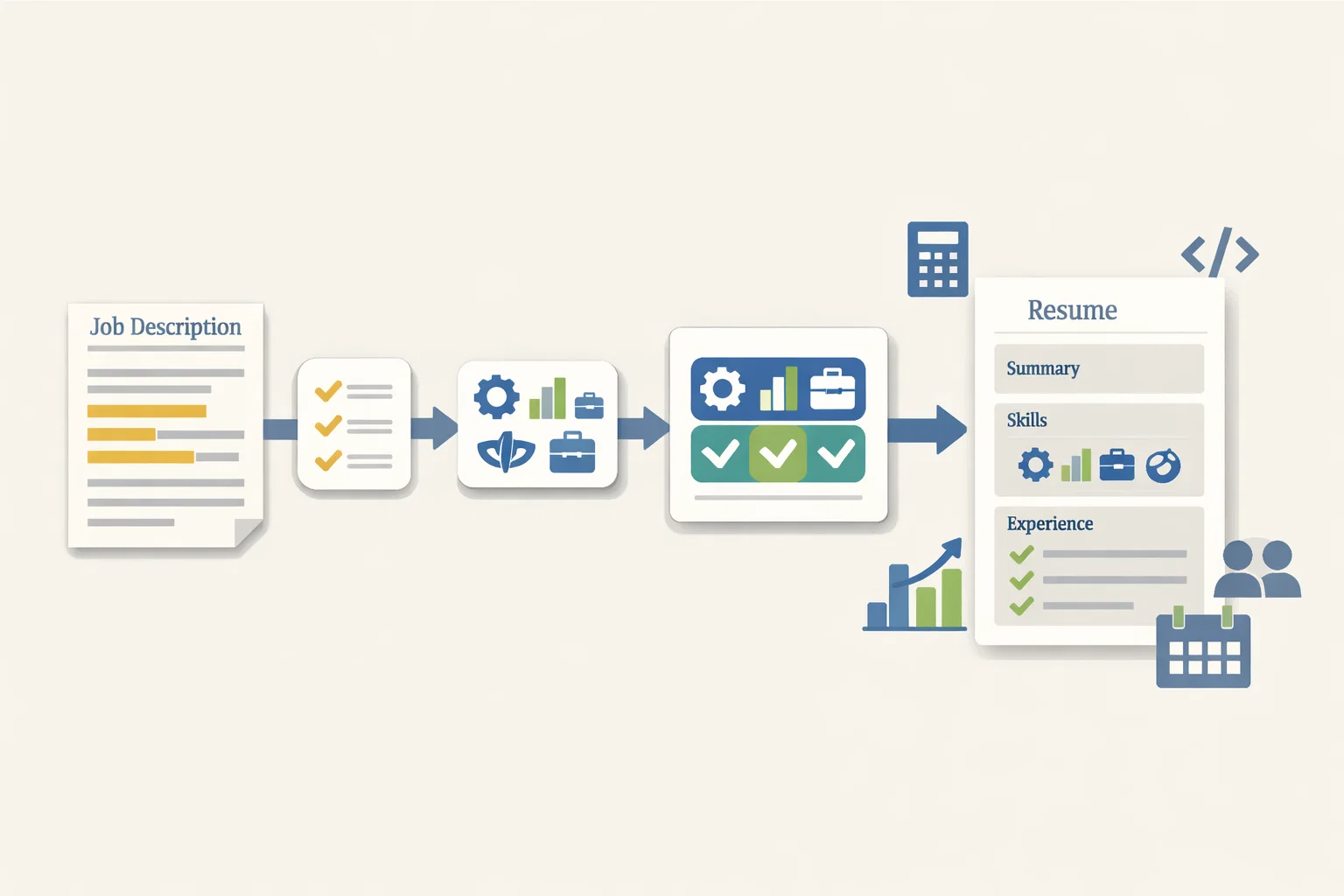
Here is a method that works for any role:
Step 1: Identify the job’s top 10 skills
Step 2: Match 8–10 of them in your summary for resume
Step 3: Match 12–18 in your skills section
Step 4: Prove 6–10 of them in your bullets
This is how you create best skills to have on resume that are job-specific.
Role examples:
-
Accountant: reconciliation, GAAP basics, QuickBooks, Excel reporting
-
Data scientist: Python, SQL, statistics, data analysis, model evaluation
-
Front-end developer: JavaScript, React, UI testing, accessibility
-
Administrative assistant: scheduling, data entry, customer service, document control
-
Human resource manager: HRIS, onboarding, compliance, employee relations
This matches what employers look for in employees: job fit, proof, reliability.
What Not to Do With Skills on Your Resume
Avoid these patterns:
-
Listing skills you cannot explain in an interview
-
Copying skill lists without matching your experience
-
Using fake proficiency levels
-
Adding unrelated skills to inflate the list
-
Writing “expert” for everything
Avoid generic filler:
-
“Great communication”
-
“Hard worker”
-
“Team player”
Use proof instead:
-
“Wrote customer updates that reduced repeat tickets by 20%”
-
“Trained 3 new hires on ticket workflows”
Optional Resume Categories
Joint or Double Concentration
If you have a double concentration, list it clearly:
MASTERS DEGREE IN BUSINESS ADMINISTRATION — Joint concentration in SUPPLY CHAIN MANAGEMENT and HUMAN RESOURCE MANAGEMENT
This helps ATS and helps a recruiter understand your direction.
Concurrent Degree
If you earned degrees at the same time, show it directly:
Bachelor’s Degree in Marketing (Concurrent Degree with Data Analytics Certificate)
Resume Templates
Resume Template 1 (With Bullet Points)
Name
City, State | Phone | Email | LinkedIn
Headline
Target Role | 2–3 core skills
Summary for resume
1–3 lines with years, specialty, top skills, top tools
Skills to list on resume
Tools: …
Hard skills: …
Soft skills: …
Work Experience
Job Title — Company, City, State | Dates
-
Bullet with action + skill + tool + outcome
-
Bullet with action + skill + tool + outcome
-
Bullet with action + skill + tool + outcome
Education
Degree, School, City, State | Year
Certifications
Certification | Year
Projects (Optional)
Project title + 1–2 bullets
Resume Template 2 (Paragraph Format)
Name
City, State | Phone | Email
Summary paragraph
A short paragraph that includes your top skills and tools.
Skills section
A clean list of skills grouped by category.
Experience paragraph
A short paragraph per role, then 2–3 bullets for proof.
Education and certifications
The Skills Section: Key Advice
How to Create a Resume Skills Section
Use this simple format:
-
6–10 tools and systems
-
6–10 hard skills
-
3–5 soft skills (only if you can prove them)
This answers what are some good skills to put on a resume and what are some good skills.
How to Include Skills in Your Work Experience Section
If your skills list says “project management,” your bullets must show:
-
scope
-
timeline
-
tools
-
outcomes
Example bullet:
-
Managed a 6-week onboarding process update using Asana, cutting setup time by 25%
Group Skills by Category
Good categories:
-
Computer skills
-
Data analysis
-
Customer service skills
-
Project management
-
Sales and upselling
This helps the reader scan fast.
Indicate Proficiency Levels
Use simple levels only when it helps:
-
Excel: Intermediate (pivot tables, VLOOKUP/XLOOKUP)
-
SQL: Intermediate (joins, aggregations)
-
Spanish: Conversational
Avoid inflated labels.
List Technical Qualifications
Technical qualifications should be specific:
-
Programming languages: Python, JavaScript
-
Tools: Jira, Salesforce, Zendesk, Google Workspace
-
Data: SQL, Tableau, Power BI
Use a Simple Skills List
A simple list is ATS-friendly:
Skills to add to resume: Excel, Google Workspace, data entry, customer service, scheduling, reporting, conflict resolution, quality assurance
Hard vs. Soft Skills
Hard Skills to Include
Hard skills are your strongest ATS keywords. Examples:
-
Data entry
-
Data analysis
-
Project management
-
Computer skills and literacy
-
Technical skills
-
Quality assurance
-
CRM tools
-
Google Workspace and Microsoft Office
This supports searches like best skills to put on a resume and best skills to have on resume.
Soft Skills (Use Sparingly)
Soft skills work when you prove them.
If you want how to add soft skills to resume, pick 3 and prove them in bullets:
-
Communication
-
Time management
-
Teamwork
Additional Resources
Using AI to Write or Edit Your Documents
AI can help you rewrite bullets and match ATS keywords, then you still need to check accuracy and tone. Tools people use include Jobscan and Resume Worded for ATS feedback and keyword checks.
Writing an Effective Cover Letter
A cover letter should support the resume, not repeat it. Use the internal link phrase cover letter vs resume in your blog to guide readers.
Some General Rules About Letters:
-
Match the job title
-
Use 2–3 skills from the job post
-
Prove 1–2 results with numbers
-
Keep it to 200–350 words
Summary
This article explains skills to list on a resume that employers in the United States actually want to see in 2026. It focuses on practical, job-relevant skills that work for both hiring managers and Applicant Tracking Systems (ATS), not generic filler skills.
It breaks down different types of resume skills, including hard skills, soft skills, transferable skills, and adaptive skills, and shows exactly where to put skills on a resume so they get noticed. You’ll also see how to match skills to a job description, how to prove skills with real examples, and how to avoid common mistakes that lower interview chances.
The guide includes correct USA resume examples, ATS-friendly templates, and step-by-step advice for students, first-job seekers, and experienced professionals. Everything is written in clear language so you can apply it right away.